 Citadel
Docker Swarm
Connect a Swarm manager, configure node coverage, and manage cluster resources.
A Docker Swarm Platform connects Citadel to an existing cluster through one manager. It provides cluster inventory, Node administration, overlay Networks, and native Docker Secrets and Configs.
The connected manager is covered for node-local operations. Install node agents from Cluster node coverage to extend Task logs, terminals, statistics, and Volume browsing to other eligible Nodes. Saving a Platform does not install them.
Use Swarm Services for individual managed Services or Swarm Stacks for Compose applications. Citadel Deployments require Docker Standalone.
Before You Begin
Citadel connects to an existing Swarm. It does not initialize, join, leave, or repair a cluster.
You need:
- an active Docker Swarm;
- a reachable manager node;
- Docker Engine API v1.41 or newer;
- Platform Write permission to register the Platform;
- a Local, regular Agent, or Edge Agent connection to the manager.
Do not connect a Swarm Platform to a worker. Workers run Tasks but cannot serve the manager API used for cluster inventory.
Add A Swarm Platform
Open Platforms, select Add Platform, and choose Docker Swarm as the Platform type.
For a Local or regular Agent connection:
- Enter the connection details.
- Select Test connection.
- Review the detected Cluster ID, manager status, and Docker version.
- Save the Platform.
For an Edge Agent connection:
- Save the Platform placeholder.
- Enroll the Edge Agent on an active Swarm manager.
- Wait for Citadel to validate the daemon and mark the Platform online.
Citadel rejects a Standalone daemon, a Swarm worker, an unsupported API version, or a Cluster ID already registered by another Platform. The Platform type cannot be changed after creation. A replacement manager endpoint must report the same Cluster ID.
Understand Cluster Node Coverage
Swarm cluster resources and node-local Docker resources come from different Docker APIs:
- Nodes, Services, Tasks, Secrets, Configs, and overlay Networks are available through an active manager;
- Containers, live container statistics, exec sessions, local Images, local Volumes, and local Networks belong to the Node running or storing them.
Without node agents, the Containers, Images, Volumes, and local Networks views describe the connected manager rather than every Node. A Task scheduled on a worker remains visible, but its node-local runtime operations are unavailable.
Use Cluster node coverage on the Platform page to install the node data
plane. Install node agents creates a Citadel System global Docker Service
on eligible Linux Nodes not already covered by the manager connection. Each
satellite runs the existing Agent in a restricted outbound swarm-node
profile and opens no inbound management port. The Platform remains one Swarm
Platform; its manager connection can be Local, regular Agent, or Edge Agent.
With coverage installed, Citadel aggregates current Containers, Images, Volumes, and local Networks from covered Nodes. Each local resource keeps its Node identity: same-named Volumes on different Nodes remain separate. Image, Volume, and local Network inspect plus Volume browse/download route to the selected owning Node. Task inspect, logs, statistics, and Terminal also route to the exact owning Node. Service statistics sum the available current Task samples and explicitly report partial coverage when a Node or Task sample is missing. Service chart history is retained across routine Task replacement, rollout, restart, and cleanup of stopped Task containers. An offline satellite keeps its last-known node-local projections marked stale; it does not make the manager or whole Platform offline.
An active supported worker remains part of expected coverage while it is down, so coverage becomes Partial instead of shrinking the total. A deliberately paused or drained Node is shown as unschedulable and is not counted as a missing Agent target until it becomes active again.
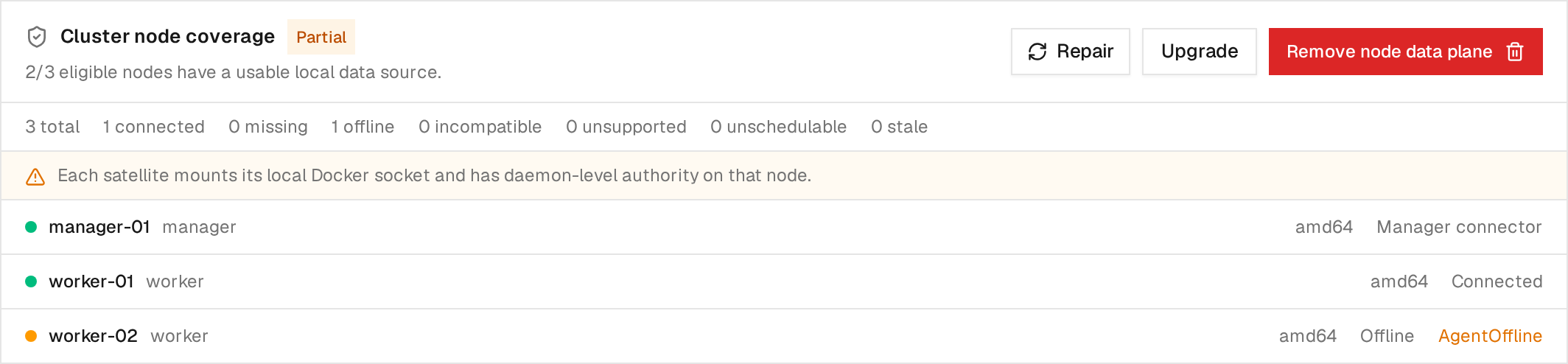
Example coverage with demo Nodes: the manager and worker-01 have usable local
data sources, while worker-02 is offline. Partial describes node coverage;
it does not mean the manager connection is offline. Select the image to inspect
the per-Node status.
The System Service is infrastructure owned by Citadel, not a user Stack or managed Service. It mounts each Node's Docker socket read-write, which gives it daemon-level access. Installation, repair, upgrade, and removal are therefore explicit privileged actions and never happen when you only Test or Save a Platform. A single-Node Swarm is already covered by its manager and does not need a satellite Service.
Do not reuse the regular Platform Agent or Edge Agent enrollment token on every Node. Citadel creates a separate, expiring, cluster-scoped bootstrap credential for satellite enrollment. Use Repair in Cluster node coverage when a new eligible Node joins after that enrollment window expires. Upgrade and removal are also explicit Platform actions. Requests and final outcomes appear in the Platform's activity history; bootstrap credentials are never included there.
Clean Up Historical Task Containers
The Swarm Platform Config tab includes Prune historical task containers. It is enabled by default. During container synchronization, Citadel deletes a bounded batch of exited or dead Swarm Task containers on the connected manager and every covered worker. Running Tasks and stopped Docker Standalone or Compose containers are never removed by this setting.
Disable the setting if you need Docker Desktop or the Docker CLI to retain the manager's stopped Task containers for manual inspection. Citadel still hides that terminal history from current Stack membership, counts, and health. Worker history is pruned only while that worker has a usable node data source.
Use The Swarm Pages
Selecting a Swarm Platform opens its Swarm navigation:
- Overview shows connection/freshness health, manager quorum, and Node, manager, Service, and running/desired Task counts. The Platforms list also shows quorum separately from the manager connection indicator.
- Nodes shows manager/worker role, readiness, availability, reachability, Engine details, labels, and Task counts.
- Services shows mode, image, replica counts, update state, ports, labels, and ownership classification. Eligible unmanaged Services can be adopted; create new managed Services from Citadel's Swarm Services page.
- Tasks shows current and recent scheduler attempts, including Service, Node, desired/current state, image, and Docker error details. A running Task can use inspect, logs, statistics, and Terminal when its owning Node is covered.
- Networks shows Swarm-scoped Network metadata and attached Services.
- Secrets uses one Inspect tab for details, referencing Services, and labels. Docker never returns stored Secret values, so the Edit dialog exposes labels only. Citadel can create Secrets, edit their labels, and delete unused Secrets.
- Configs uses one Inspect tab for details, referencing Services, and labels. The Edit dialog loads current content directly from Docker into a read-only editor and keeps labels editable. Citadel can create Configs, edit their labels, and delete unused Configs.
Images, Volumes, and local Networks are Node-local rather than cluster inventory. Their tables show the owning Node and can contain multiple entries with the same local name. Citadel does not infer that an Image present on one Node exists on another. Browsing a Volume targets its exact Node; destructive Image, Volume, and local Network actions remain disabled.
For applications running on this cluster, see Swarm Services and Swarm Stacks. For existing workloads, see adoption.
Understand Health And Freshness
Citadel stores the last successful Swarm observation so inventory remains available when the manager disconnects.
Connection and quorum are different signals. Connection reports whether Citadel can reach the configured manager. Quorum reports whether the Swarm control plane has an elected leader and enough reachable managers for a Raft majority. Workers do not count toward quorum.
- Quorum healthy means a leader exists and all known managers are reachable.
- Quorum degraded means a majority is still reachable, but at least one manager is unavailable.
- Quorum lost means no leader exists or fewer than
floor(manager count / 2) + 1managers are reachable. - Quorum unknown means Citadel cannot safely evaluate current manager membership because the Platform is offline or manager inventory is stale.
A healthy single-manager Swarm has quorum but no manager failure tolerance. Citadel reports that limitation in the quorum tooltip.
- Healthy means the manager is online, exposes Swarm control, and the persisted inventory and quorum are healthy.
- Stale means some inventory is last-known state and may no longer match Docker because a refresh failed. Node-local inventory can also be stale when its Node Agent is unavailable.
- Degraded means the endpoint is online but does not currently expose usable manager control, or Docker reported a sanitized manager error.
- Offline means Citadel cannot currently reach the Platform.
Treat stale data as diagnostic only; do not assume it is safe to act on outside Citadel.
Citadel uses Docker daemon events for prompt refreshes after Service, Node, Network, Secret, or Config changes. A bounded reconciliation also runs every 30 minutes to recover from missed events, reconnects, and partial event data. Multiple events for one Platform are coalesced so they do not create an unbounded queue of refresh jobs.
Manage Nodes
Platform Write permission allows you to edit a Node's availability and labels. Open a Node and use the grouped scheduling actions:
- Active to allow the scheduler to assign new Tasks;
- Pause to prevent new assignments without moving existing Tasks;
- Drain to move eligible Service Tasks away from the Node and prevent new assignments.
Use the separate Edit action to change Node labels. The current labels are shown at the bottom of the Node page.
You can also select one or more Nodes in the Nodes table and set their availability from the bottom action bar. Draining requires confirmation. Node indicators remain green while ready and active, turn orange while scheduling is paused, and turn gray when drained; a down or disconnected Node remains red.
Citadel preserves the Node's name and manager/worker role. It rejects an edit if the Node observation is stale or Docker's Node version changed after the form was opened. Citadel does not promote, demote, join, remove, or leave Nodes.
Manage Overlay Networks
Use the Swarm Platform's Networks page to create an overlay Network. The form supports attachable and internal modes, IPAM settings, IPv6 where Docker supports it, driver options, and labels. Swarm scope requires the overlay driver and a Docker Swarm Platform.
Deleting a Network requires Platform Execute permission. Citadel refuses to delete Docker system Networks, Stack-owned Networks, Networks with connected Containers, Networks referenced by a Service, or Networks whose inventory is stale. Docker performs the final check if usage changes concurrently.
Manage Secrets And Configs
Platform Write permission is required for all mutations. Select Add Secret or Add Config on the corresponding page to create a resource. Citadel does not store a copy of a Secret's value, and Docker does not return it after creation. Keep a secure copy if you may need the value later.
On a Config page, Edit opens a dialog and loads the content from the connected Swarm manager only when the user has Platform Inspect permission. The editor is read-only; Citadel does not persist the content in its inventory projection or publish it through SignalR. On a Secret page, Edit opens the same compact dialog but shows labels only because Docker does not disclose the stored value.
The indicator beside each resource name reports usage:
- green means one or more observed Services reference the resource;
- gray means the resource is unused.
Use the row checkbox to select one or more resources. Delete is enabled only when every selected resource is unused and its observation is current. Citadel checks the same rule again in the API immediately before deletion. Docker is the final concurrency guard: if a Service starts using a resource between the check and delete, Docker rejects the operation and Citadel reconciles the result.
Docker supports changing Secret and Config labels in place. Editing the Secret value or Config data is not available because payload changes require a new version and coordinated Service replacement. Delete and recreate manually only after reviewing every consumer.
Permissions
- Platform Read: view the Swarm overview and persisted inventory.
- Platform Read plus Inspect: inspect live Node, Service, and Task data and load Config content.
- Platform Read plus Logs: retrieve Service and Task logs from Platform inventory.
- Platform Read plus Terminal: open a terminal for a running Task on a covered Node.
- Platform Execute plus Manage Node Agents: install, repair, upgrade, or remove node agents.
- Platform Write: register or edit the connection, change Node availability and labels, and manage Secrets and Configs.
- Platform Execute: delete eligible overlay Networks.
Managed workloads have their own Service and Stack permissions. The API enforces these checks even when a UI control is hidden or disabled.
Troubleshooting
The node is not an active Swarm manager
The selected endpoint is inactive or is a worker. Point the Local connection or Agent at an active manager and test again.
This cluster is already registered
Another Citadel Platform already uses the same Docker Cluster ID. Use that Platform or update its manager endpoint.
Inventory is stale or the manager is offline
Workloads may continue on workers while Citadel cannot manage or refresh the cluster. Restore access to a manager in the same cluster, then select Refresh inventory in the Platform's Stale warning to retry immediately. Citadel also refreshes inventory after relevant Docker events and during reconciliation. If the retry fails, the page shows the error and retains the last-known inventory. Refreshing the manager does not recover a disconnected worker's Node Agent. A successful manager refresh removes obsolete records from the current inventory. Failed refreshes preserve last-known inventory for diagnosis.
Logs are unavailable
Confirm the Platform is online, your role includes Logs permission, the Service or Task still exists on the selected Platform, and the Docker logging driver supports retrieval.
Current Limits
Citadel does not currently provide:
- Swarm initialization, join/leave, token, CA, unlock, or quorum management;
- Node role changes/removal or direct lifecycle actions on individual Tasks;
- overlay Network updates after creation;
- in-place Secret value or Config data replacement;
- Citadel Deployments on Swarm Platforms;
- cluster-wide Image distribution or general-purpose destructive node-local Image/Volume/local Network mutations;
- live-follow Service or Task logs;
- automatic failover between manager endpoints.